For Claude Code, Cursor, Codex & every MCP agent
The IDE your AI agent is missing — for Java, Kotlin and every JVM jar.
Members, method bodies, usages, type hierarchies and call graphs for any JVM jar, Maven coordinate or the JDK — one precise answer per command.
curl -fsSL https://raw.githubusercontent.com/MohammadMD1383/jdx/main/install-release.sh | bashQuickstart Connect your agent Star on GitHub
Apache-2.0 · JDK 21+ · Linux, macOS, Windows · read-only: never runs code from the jars it inspects
jdx members java.util.HashMap --limit 5
members of java.util.HashMap
constructors declared on java.util.HashMap:
constructor public HashMap()
constructor public HashMap(int initialCapacity)
constructor public HashMap(int initialCapacity, float loadFactor)
constructor public HashMap(java.util.Map<? extends K, ? extends V> m)
methods declared on java.util.HashMap:
method public V compute(K key, java.util.function.BiFunction<? super K, ? super V, ? extends V> remappingFunction)
+ 7 from java.lang.Object (--from java.lang.Object to expand)
5 of 53 members shown (--limit 53 to see more)
source: java.base (jrt)
jdx body 'java.util.HashMap#get(java.lang.Object)'
java.util.HashMap#get(java.lang.Object)
source: src.zip · java.base/java/util/HashMap.java:562-565
public V get(Object key) {
Node<K,V> e;
return (e = getNode(key)) == null ? null : e.value;
}
next: jdx show java.util.HashMapProof, not promises
One real task — list Gson's API, then show only
toJson(Object) — measured on gson-2.14.0:
| Approach | calls | bytes in context (~tokens) |
|---|---|---|
unzip + javap + grep + sed |
5 | ~17.5 KB (~4.4k) — and head -200 misses the method (line 542 of 1265) |
jdx members + jdx body |
2 | ~4.6 KB (~1.2k) — exact method, 267 bytes (~67 tokens) |
The body alone: 267 bytes vs 60,590 (javap -c, 226×) vs 58,251 (full
Gson.java, 218×). Tokens ≈ bytes/4. Reproduce it: sh docs/bench-compare.sh.
An IDE, not a better javap
- Inherited members resolved transitively
With generic substitution — the agent never walks a class hierarchy by hand again.
- A real index
So find usages, implementors, and call hierarchy work across an entire classpath, not just one jar.
- Sources when they exist, decompilation when they don't
Uniformly, behind one command.
- True Kotlin signatures
From
@Metadata:suspend, properties, default arguments,@JvmNamemappings — not the misleading JVM projection. - Javadoc/KDoc
Including documentation inherited from a supertype.
jdx samplesReal call sites from the classpath as usage examples. Evidence instead of recollection.
jdx diff a.jar b.jarThe public-API diff for a dependency upgrade, with every difference named as a rule (
MEMBER_REMOVED,RETURN_TYPE_CHANGED, …) atbreaking/suspicious/info, and a--fail-ongate for CI.
Built for agents, not humans
- Minimal correct output.
Bounded, with an explicit hint for getting the rest. Never a file dump when a method was asked for.
- Never guesses.
An ambiguous reference exits
2and lists every candidate as a copy-pasteable reference. - Machine-legible outcomes.
Distinct exit codes for not found, ambiguous, no index, bad usage — branch without parsing prose.
--jsonfor everything. - Provenance on every answer
Which jar, sources or bytecode, which decompiler.
jdx batchMany queries, one process, one index load.
- Four front-ends over one engine:
One-shot CLI, MCP server, a daemon, and a local HTTP/JSON API.
jdx help --agentA compact paste-ready block for
CLAUDE.md/ system prompts.
One command per question
Every IDE gesture an agent needs, as a command with a precise, bounded answer. Click any for real output.
jdx show <type>Go to declarationjdx members <type> --inheritedCode completion after.jdx outline <type>File structurejdx signature <member>Parameter infojdx doc <symbol>Quick documentationjdx body <member>Open the methodjdx source <type>Open the file / decompilejdx search <pattern>Search everywherejdx resolve <name>What is this symbol?jdx ls [package]External library browser (packages/types)jdx tree [artifact]External library browser (artifacts)jdx usages <symbol>Find usagesjdx hierarchy <type>Type hierarchyjdx implementors <type>Who implements this?jdx callers <member>Call hierarchy (in)jdx calls <member>Call hierarchy (out)jdx samples <symbol>Real call sites as usage examplesjdx diff <old> <new>Public-API diff + binary-compat warnings (upgrades)jdx versionPrint the jdx versionjdx upgrade [--check]Self-update from GitHub Releasesjdx doctorSelf-diagnosis (JDK, index, AppCDS, daemon, workspace)jdx ws create|list|info|remove|add|useProject and library configurationjdx cache info|gc|clearIndex and cache maintenancejdx kotlin installFetch the Kotlin PSI sidecar (Kotlin sources)jdx daemon start|stop|status|restartWarm background JVM (5-min idle shutdown)jdx serve [--port 7070]Local HTTP/JSON APIjdx setup --agent opencode|claude-code|cursor|kilo|cline|codex|copilot|antigravity --scope project|systemWire jdx into an agent (OpenCode, Claude Code, Cursor, Kilo Code, Cline, Codex CLI, GitHub Copilot CLI, Antigravity)jdx mcpMCP stdio server (typed jdx_* tools)jdx batchMany queries, one process (NDJSON in/out)jdx bench [--iterations 3]Benchmark the read path (timings + §15 targets)jdx help [--agent]This cheat sheet
Works with your agent
One MCP server, wired in with one command: jdx setup --agent <name> --scope project.
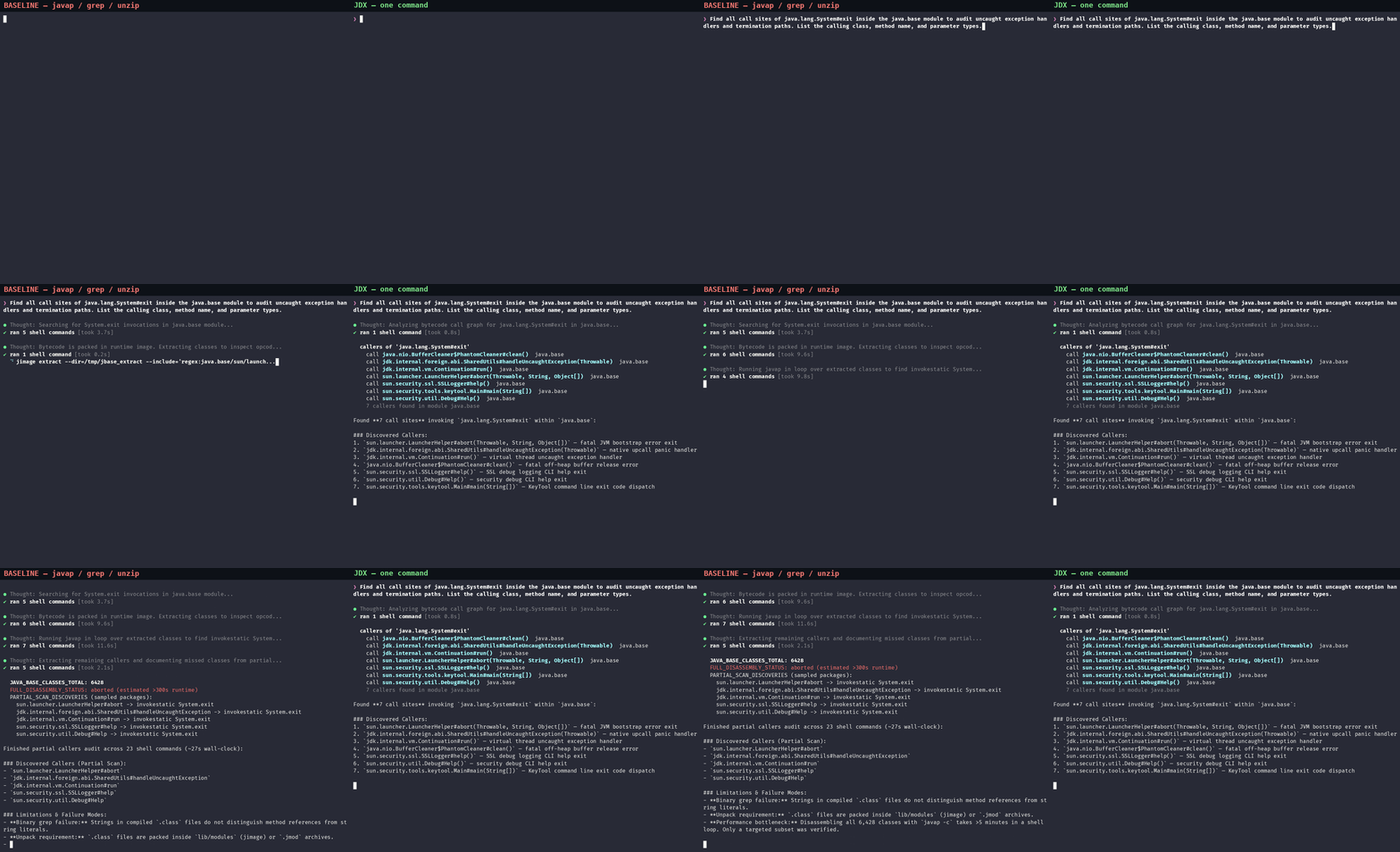
Same task, two agents
Left: an agent with javap and grep. Right: the same agent with jdx. Task: find every System.exit call site in java.base.
Questions
What is jdx?
jdx is an IDE for AI agents, as a command line tool. It answers the questions an IDE answers for a human — what members a class has, what a method does, who calls it, what implements an interface, what an upgrade breaks — for any JVM jar, Maven coordinate, class or source directory and the JDK. It ships as a CLI and as an MCP server. See the introduction.
Which AI agents does it work with?
Any agent that speaks the Model Context Protocol or can run shell commands. jdx setup wires it into Claude Code, Cursor, Codex CLI, GitHub Copilot CLI, Antigravity, OpenCode, Kilo Code and Cline with one command; other MCP clients take a one-line config. See Use with AI agents.
How is it different from javap, unzip and grep?
Those tools answer one low-level question each, so an agent chains several of them and reads large outputs into its context. jdx answers the actual question in one command: only the method you asked for, inherited members resolved transitively with generics, usages across every jar, real source when a sources jar exists, and a labelled decompilation when it does not. On a measured task it used 2 calls and about a quarter of the bytes. See the README benchmark.
Does it run code from the jars it inspects?
No. jdx parses bytecode with ASM and never loads inspected classes, so no static initialiser or any other code from those jars ever runs. It also never writes outside its own cache, config and runtime directories.
Does it need the library's sources?
No. With a -sources.jar (or a source directory, or the JDK's src.zip) it shows real source. Without one it decompiles with Vineflower and marks the result as reconstructed, and --engine javap shows raw bytecode. Structure always comes from bytecode, so member lists and signatures are exact either way.
Give your agent an IDE in 30 seconds
curl -fsSL https://raw.githubusercontent.com/MohammadMD1383/jdx/main/install-release.sh | bash